
Ask for any token's price and get an instant snapshot.
Technical analysis on demand — RSI, MACD, support, resistance.
What You Can Ask
Your bot understands natural questions. Here are a few ways to ask:
Try it now: Tell me about SOL, Compare ETH and SOL, or What’s the market sentiment for BTC? — clicking opens Telegram with the prompt prefilled to your D0 bot.
What’s Included in a Token Analysis
When you ask about a token, your bot gathers data from multiple sources and presents it as a clear summary.Price & Market Data
- Current price and 24h / 7d price change
- Market capitalization and fully diluted valuation
- 24-hour trading volume
- Circulating supply and total supply
Security Check
- Safety score (0-100) — how safe the token’s smart contract is
- Risk flags — concentrated holder ownership, minting authority, or freeze authority
- Top holder analysis — how much of the supply is held by the top wallets
- Liquidity check — confirms there’s enough liquidity for safe trading
Social & Community
- Links to the token’s website, Twitter, Telegram, and Discord
- Community size indicators
- Social mention trends
Deep Research Reports
For a comprehensive analysis that goes beyond the basics, ask for deep research. Your bot will generate a full multi-factor report combining:- Price action and technical trends
- On-chain metrics (whale movements, exchange flows, holder behavior)
- Social sentiment across Twitter and Telegram
- Derivatives positioning (funding rates, open interest, liquidations)
- Risk assessment and trade setup ideas
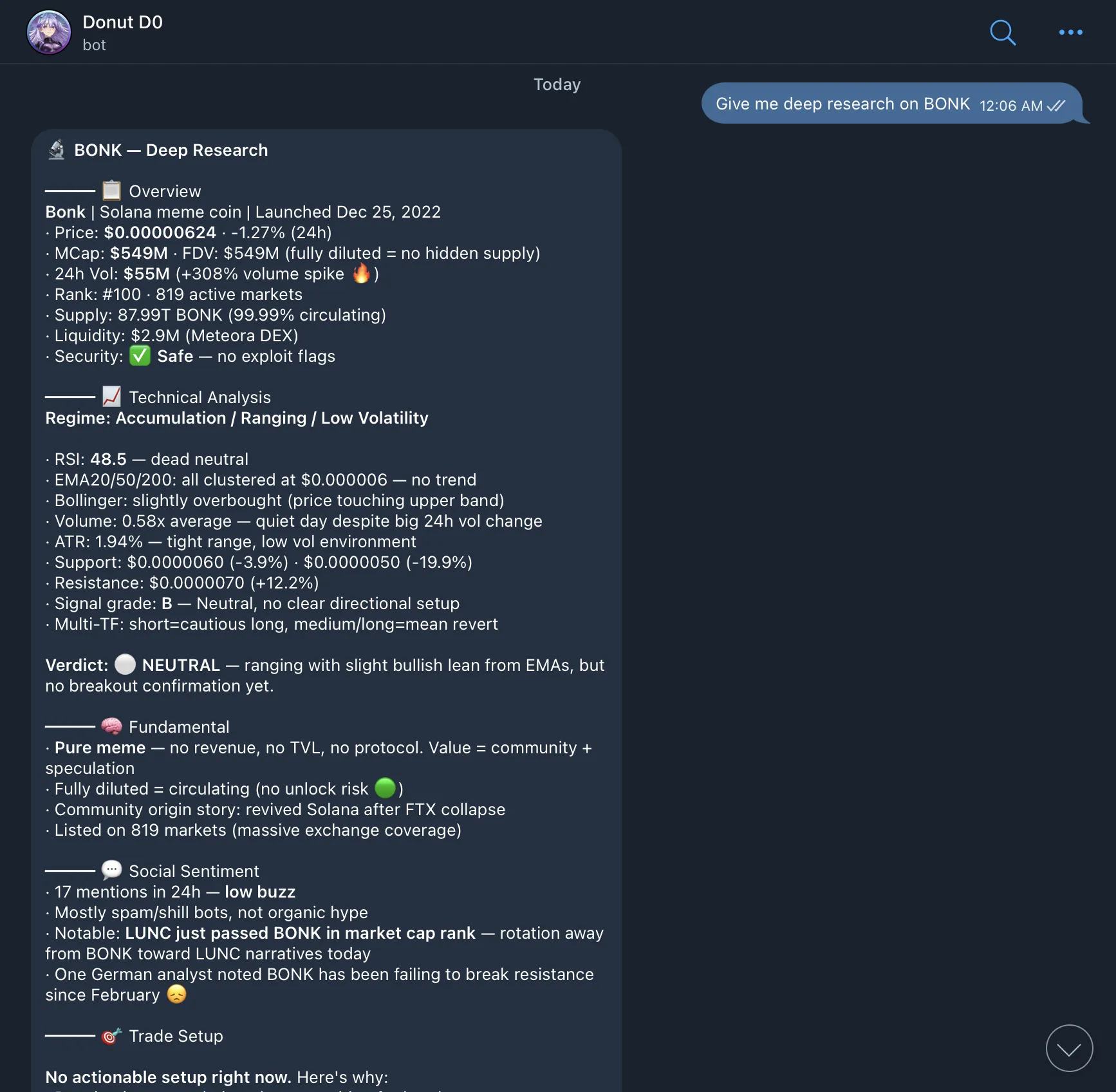
You: “Give me deep research on BONK” Bot: Generates a comprehensive report covering price trends, on-chain whale activity, social buzz, derivatives data, and a risk-adjusted trade setup.Try it: Give me deep research on BONK.
US Stocks & Macro Tracking
D0 can track major US stock indices and macro indicators in real time. This helps you understand how traditional markets are moving and how that might affect crypto. What you can track:- S&P 500 (SPY)
- NASDAQ (QQQ)
- Dow Jones
- VIX (volatility index)
- Individual stocks (AAPL, TSLA, NVDA, etc.)
- Gold, Oil, DXY (US Dollar Index)
- 10-Year Treasury yields
You: “What’s the S&P 500 doing?” Bot: “S&P 500 (SPY): $720.65 +0.28% 🟢 NASDAQ (QQQ): $674.15 +0.96% 🟢 VIX: 16.99 (calm, low fear) Gold: $4,644.50 +0.32% Oil: $101.94 -2.98% 🔴”This is useful for understanding macro conditions. When SPY dumps, BTC often follows. When the VIX spikes, risk assets (including crypto) tend to sell off. Try it: What’s the S&P 500 doing? or Show me VIX, DXY, and 10-year yield.
Example Conversation
You: “What can you tell me about JUP?” Bot: “Here’s what I found about Jupiter (JUP): Price: $1.24 (+8.3% in 24h) Market Cap: $1.67B (#42) 24h Volume: $285M Safety Score: 92/100 (Low Risk) JUP is the governance token of Jupiter, the leading DEX aggregator on Solana. Top 10 holders control 18% of supply. No mint authority detected. LP is locked. Sources: Birdeye, CoinGecko, Rugcheck”
Data Sources
Your bot doesn’t rely on a single data provider. It cross-references multiple trusted sources to give you the most accurate picture:- Birdeye — On-chain token data and DEX analytics
- CoinGecko — Global market data and token information
- CoinMarketCap — Market rankings and trading volumes
- Rugcheck — Smart contract security audits
- Alternative.me — Fear & Greed Index and sentiment data
Tips for Better Results
- Be specific. “Analyze SOL on the 4h timeframe” gives better results than just “SOL”.
- Use contract addresses. For lesser-known tokens, paste the contract address so your bot can identify it accurately.
- Ask follow-ups. After an initial analysis, ask things like “What are the risks?” or “Is it a good time to buy?” Your bot remembers the context and can dive deeper.