
The Scenario
You’re a crypto trader who follows multiple tokens. Every day, you need to:- Check prices and trends
- Analyze charts before making entries
- Monitor market sentiment and social buzz
- Execute trades when the moment is right
- Stay informed about news and on-chain activity
A Typical Morning Routine
Here’s what a trading session might look like with your D0 bot:1. Market Overview (30 seconds)
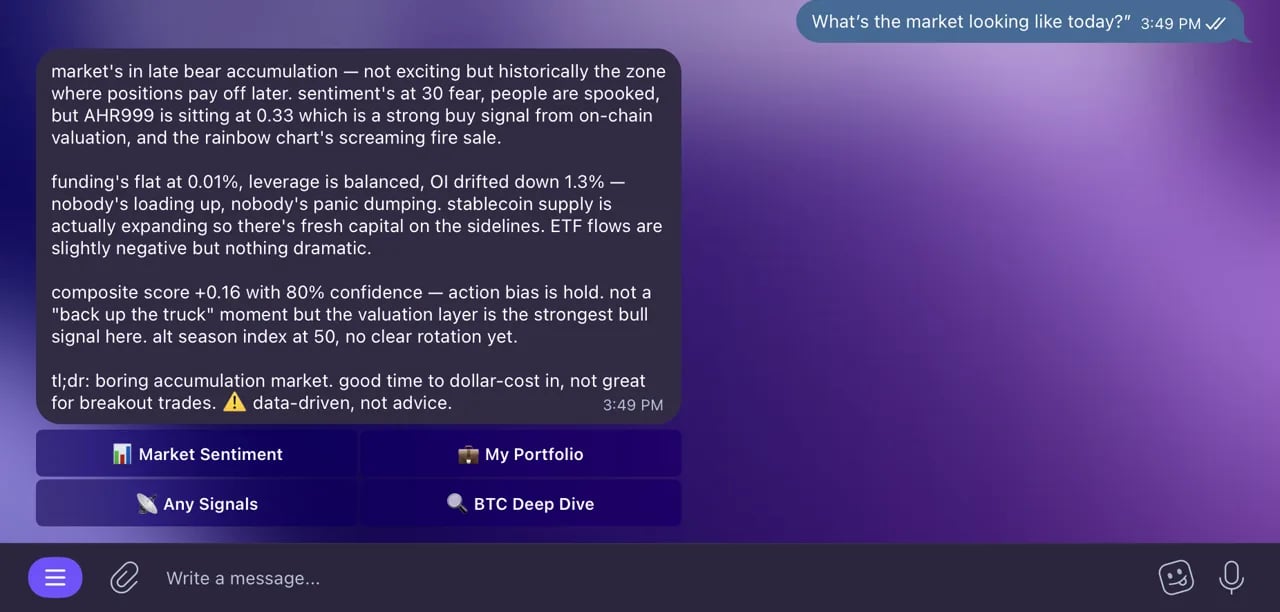
A full market read in one message.
You: “Good morning. What’s the market looking like today?”
Bot: “Market Sentiment: 68 (Greed).
BTC: $98,450 (+1.2% in 24h)
ETH: $3,850 (-0.3%)
SOL: $142 (+4.8%)
Notable: SOL is outperforming after a major ecosystem announcement. Fear & Greed shifted from Neutral to Greed overnight.”
2. Check Social Trends (30 seconds)
You: “What’s trending on crypto Twitter?”
Bot: “Top trending tokens (24h):Top narrative: ‘Solana DeFi Renaissance’ — mentions up 340% this week.
- SOL — 12,500 mentions (+180%)
- WIF — 8,200 mentions (+250%)
- JUP — 5,100 mentions (+120%)
Jupiter announced a $200M ecosystem fund. This is driving the SOL momentum.”
3. Deep Dive on a Token (1 minute)
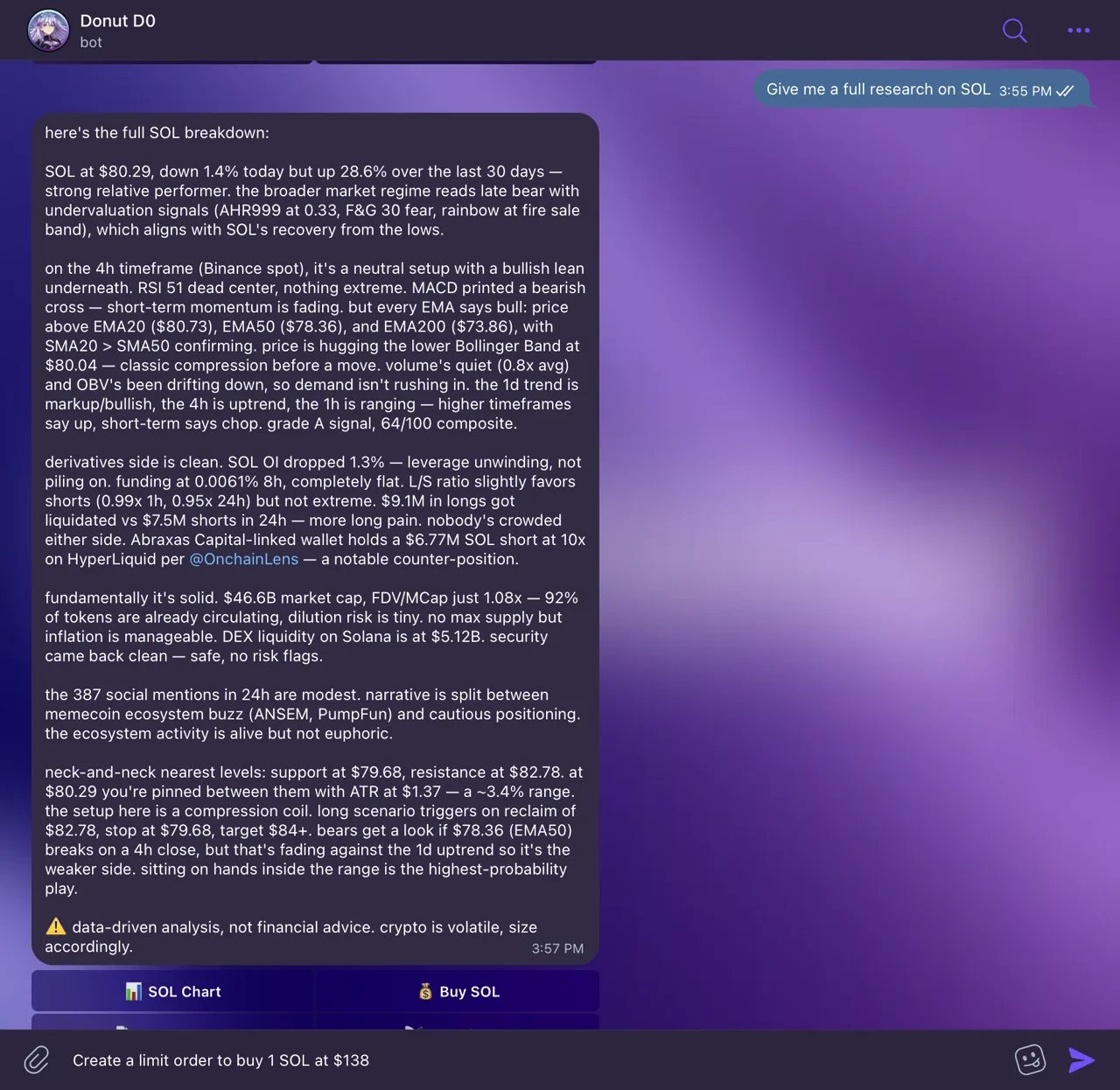
Full token research in one message.
You: “Give me a full research on SOL”
Bot: “SOL analysis:Technical Analysis (4H):
- Price: $142.35 (+4.8% in 24h, +12% in 7d)
- Volume: $3.2B (up 85% from yesterday)
- Market cap: $65.8B
- Safety: 95/100
Recent news: Jupiter announced a $200M ecosystem fund. Top DEX volume on Solana hit ATH.”
- Trend: Bullish, higher highs and higher lows
- RSI: 64 — strong but not overbought
- MACD: Bullish crossover 12 hours ago
- Support: $138 | Resistance: $148, $155
4. Chart Analysis (1 minute)
You: (sends a SOL/USDT 4H chart)
“Is this a good entry?”
Bot: “Looking at the 4H chart:This looks like a healthy breakout. A pullback to $138-$140 could be a lower-risk entry.”
- Bullish breakout above the $138 resistance with strong volume
- RSI at 64 — momentum is strong but not overbought yet
- Next resistance at $148, then $155
- Support at $138 (previous resistance)
5. Execute a Trade (15 seconds)
You: “Swap 50 USDC to SOL”
Bot: “Quote: You’ll receive ~0.35 SOL for 50 USDC.
Price impact: 0.01%. Route: USDC → SOL via Jupiter.
Shall I execute?”
You: “Yes”
Bot: “Transaction submitted! TX: 5abc…xyz. You received 0.3498 SOL.”
6. Set a Limit Order (10 seconds)
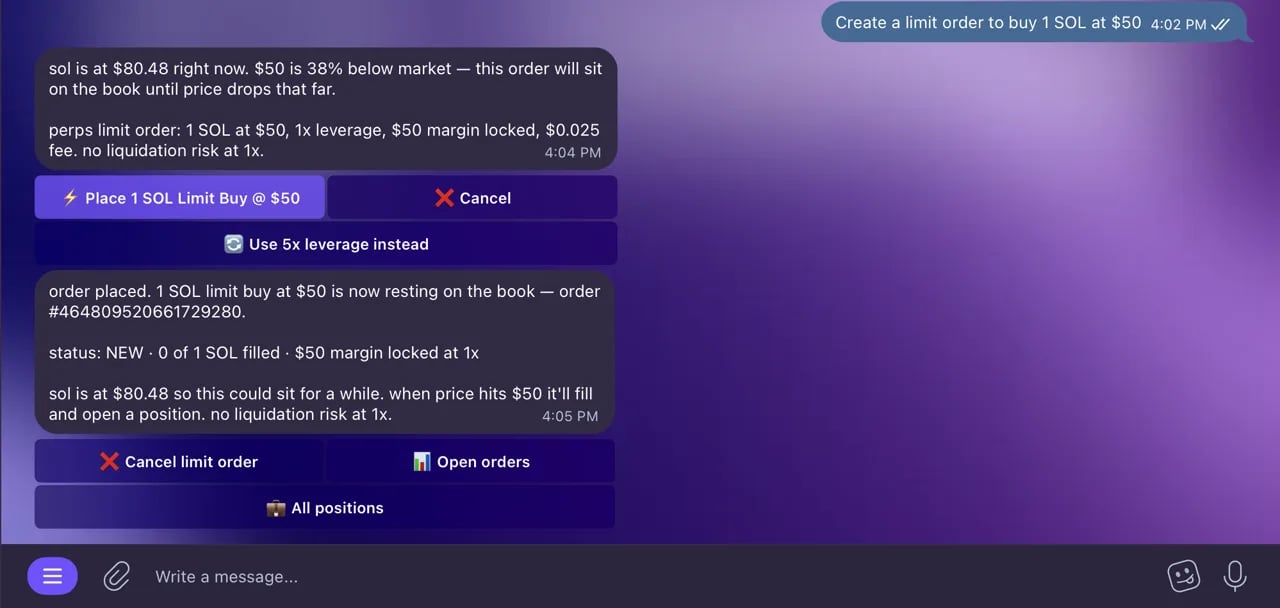
A resting limit order, set from chat.
You: “Create a limit order to buy 1 SOL at $138”
Bot: “Limit order preview: Buy 1 SOL when price drops to $138 USDC.
Execute?”
You: “Yes”
Bot: “Limit order created! Order ID: 12345. I’ll fill the order when SOL reaches $138.”
7. Set an Alert (10 seconds)
You: “Alert me if SOL drops back to $138”
Bot: “Done! I’ll notify you when SOL goes below $138. Current price: $142.35.”
8. Check Your Portfolio (15 seconds)
You: “How does my portfolio look?”
Bot: “Wallet: $14,630 (+3.5% today)Total time: about 5 minutes. That’s a complete trading session — market overview, social trends, token research, chart analysis, trade execution, limit order, alert setup, and portfolio review — all in one place.Perps Account: Equity $5,200, Available $3,800
- SOL: 42.85 ($6,085) — 41.6%
- USDC: 3,450 ($3,450) — 23.6%
- JUP: 2,100 ($2,604) — 17.8%
- …
Total: $19,830”
Why This Flow Works
- It keeps discovery, analysis, and execution in one thread, so context is not lost between steps.
- It enforces preview-then-confirm at the execution point.
- It shortens reaction time during fast market moves without skipping risk checks.
Pro Tips for Trading with D0
- Start your day with trends — Ask for both market overview and social trends to get the full picture
- Use the two-step workflow — Every trade shows a preview first, so you can verify before committing funds
- Research before trading — Ask for technical analysis + fundamentals + social sentiment before making a decision
- Set alerts at key levels — After chart analysis, immediately set alerts at the support/resistance levels your bot identified
- Use limit orders for precision — Don’t want to buy at market price? Set a limit order at your target entry
- Combine data points — Ask for fundamentals, then send a chart, then check sentiment. Your bot keeps context from the whole conversation
- Quick checks throughout the day — Price checks and portfolio updates take seconds
- Check your orders — Ask “show my orders” to track limit orders and their status