> ## Documentation Index
> Fetch the complete documentation index at: https://docs-d0.donutbrowser.ai/llms.txt
> Use this file to discover all available pages before exploring further.
# Explore
> 一个问题,四扇门:Market Opportunities、Proven Strategies、Expert Profiles、Ask Anything。
顶栏的 **Explore** 以一个问题开场,*What would you like to discover today?*,下面是四扇门。无论走哪一扇,页面底部的对话都跟着你。
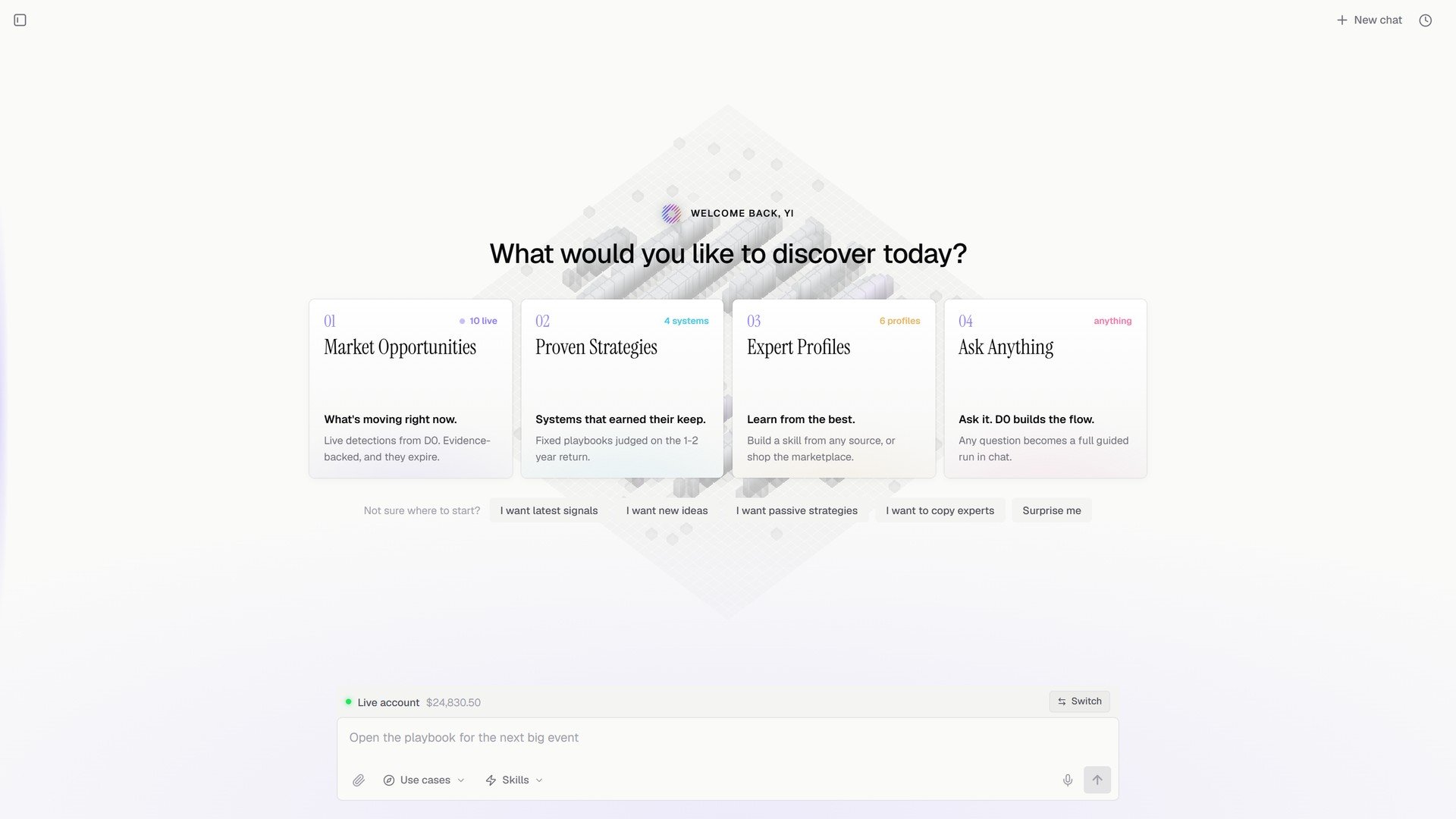 | 门 | 门后是什么 |
| - | - |
| **01 Market Opportunities** | 现在在动什么。来自 D0 的实时检测,有证据支撑,并且会过期。 |
| **02 Proven Strategies** | 靠得住的系统。按 1 到 2 年收益评判的固定打法。 |
| **03 Expert Profiles** | 向最好的人学。从任意来源构建一个技能,或者在市场里挑选。 |
| **04 Ask Anything** | 问它,D0 搭好流程。任何问题都变成对话里一次完整的引导式运行。 |
不知道从哪开始?门下方的快捷选项替你选:**I want latest signals**、**I want new ideas**、**I want passive strategies**、**I want to copy experts**、**Surprise me**。
## Market Opportunities
实时市场情报,按可操作性排序。顶部是扫描器状态(*Signal coming in, scoring the evidence*,附跟踪钱包数、数据源数、今日信号数和平均置信度)。**Trade Setups** 是可操作的卡片,可按 **All**、**Smart money**、**Strategy**、**Events**、**Funding**、**Watchlist** 筛选;每张带入场、目标、止损、胜率,以及 **Analyze** / **Execute**。**On the Radar** 列出正在形成但还没准备好的。
| 门 | 门后是什么 |
| - | - |
| **01 Market Opportunities** | 现在在动什么。来自 D0 的实时检测,有证据支撑,并且会过期。 |
| **02 Proven Strategies** | 靠得住的系统。按 1 到 2 年收益评判的固定打法。 |
| **03 Expert Profiles** | 向最好的人学。从任意来源构建一个技能,或者在市场里挑选。 |
| **04 Ask Anything** | 问它,D0 搭好流程。任何问题都变成对话里一次完整的引导式运行。 |
不知道从哪开始?门下方的快捷选项替你选:**I want latest signals**、**I want new ideas**、**I want passive strategies**、**I want to copy experts**、**Surprise me**。
## Market Opportunities
实时市场情报,按可操作性排序。顶部是扫描器状态(*Signal coming in, scoring the evidence*,附跟踪钱包数、数据源数、今日信号数和平均置信度)。**Trade Setups** 是可操作的卡片,可按 **All**、**Smart money**、**Strategy**、**Events**、**Funding**、**Watchlist** 筛选;每张带入场、目标、止损、胜率,以及 **Analyze** / **Execute**。**On the Radar** 列出正在形成但还没准备好的。
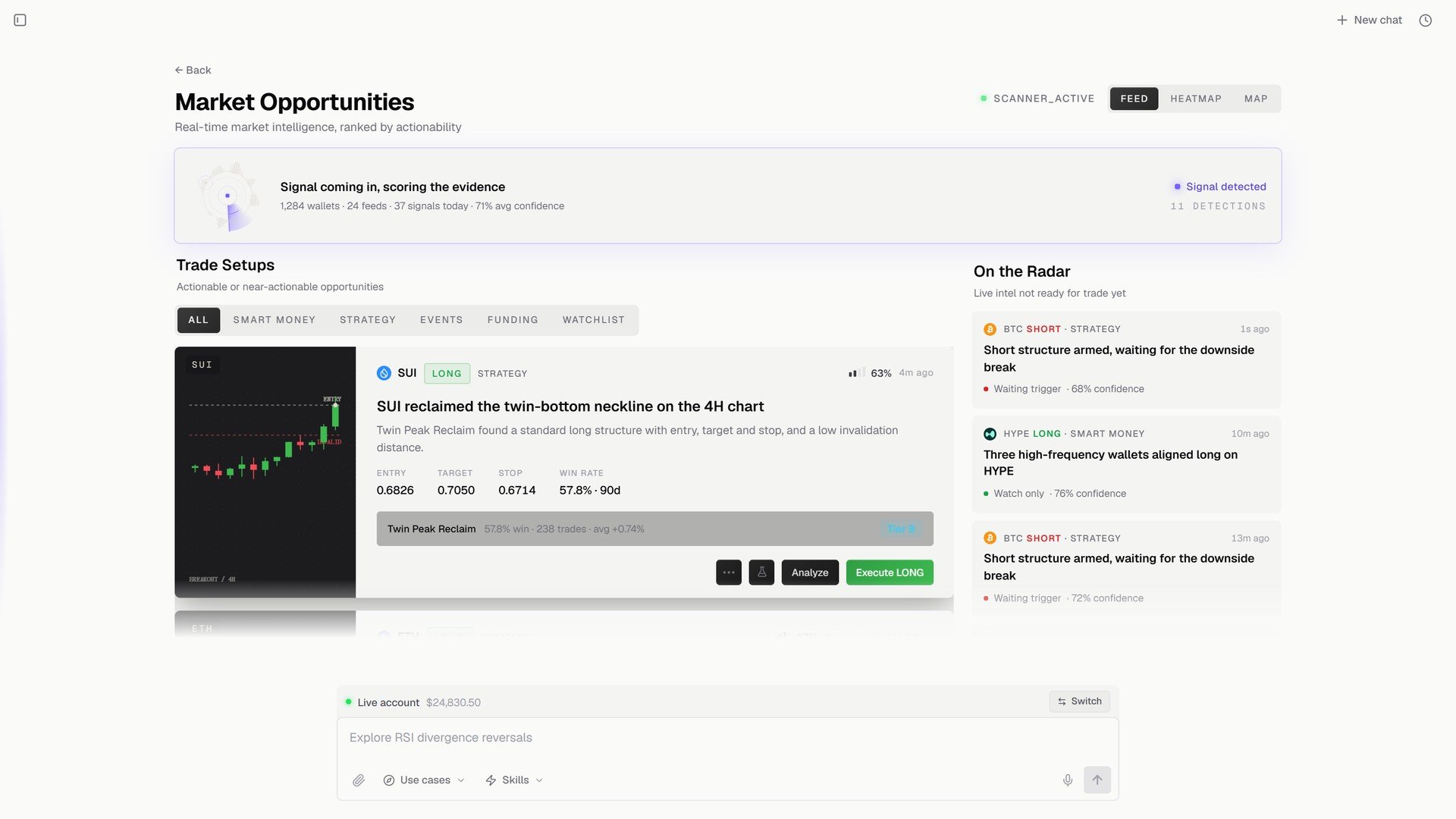 **Feed**、**Heatmap**、**Map** 切换同一批检测的呈现方式。见[信号](/zh/features/thorp-strategy)。
## Proven Strategies
固定、常驻的系统,按长期表现评判、按收益排序。顶部四个列表(**Bullish signal**、**Bearish signal**、**Top Inflow token**、**Top Outflow token**),下面是 **Featured strategies**,带 2 年总收益、胜率、最大回撤、总 AUM,每行有 **Run strategy** / **Paper Trade**。
**Feed**、**Heatmap**、**Map** 切换同一批检测的呈现方式。见[信号](/zh/features/thorp-strategy)。
## Proven Strategies
固定、常驻的系统,按长期表现评判、按收益排序。顶部四个列表(**Bullish signal**、**Bearish signal**、**Top Inflow token**、**Top Outflow token**),下面是 **Featured strategies**,带 2 年总收益、胜率、最大回撤、总 AUM,每行有 **Run strategy** / **Paper Trade**。
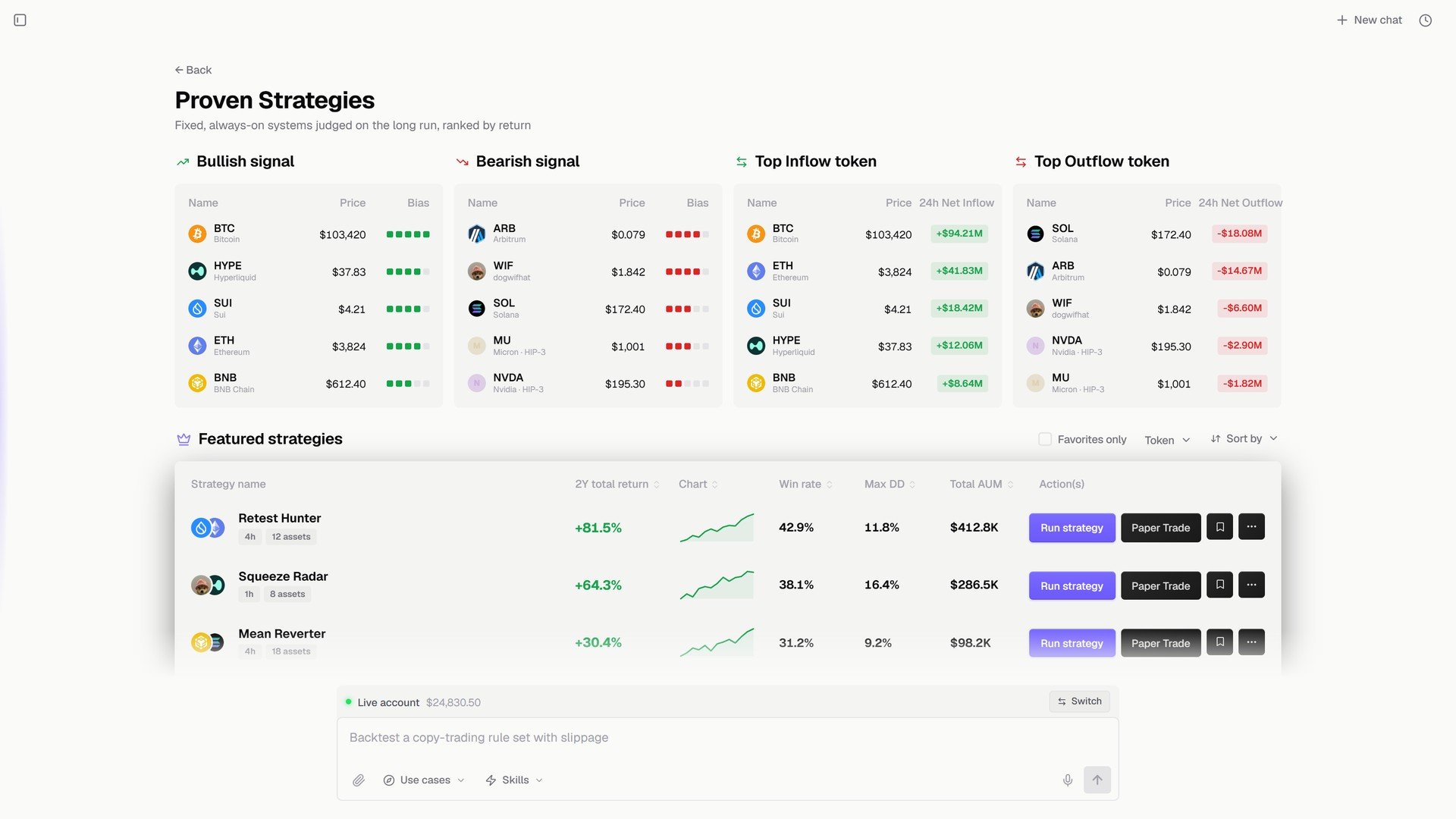 运行一个策略走的是和策略库一样的仓位设置。见[运行策略:仓位管理](/zh/strategies/position-management)。
## Expert Profiles
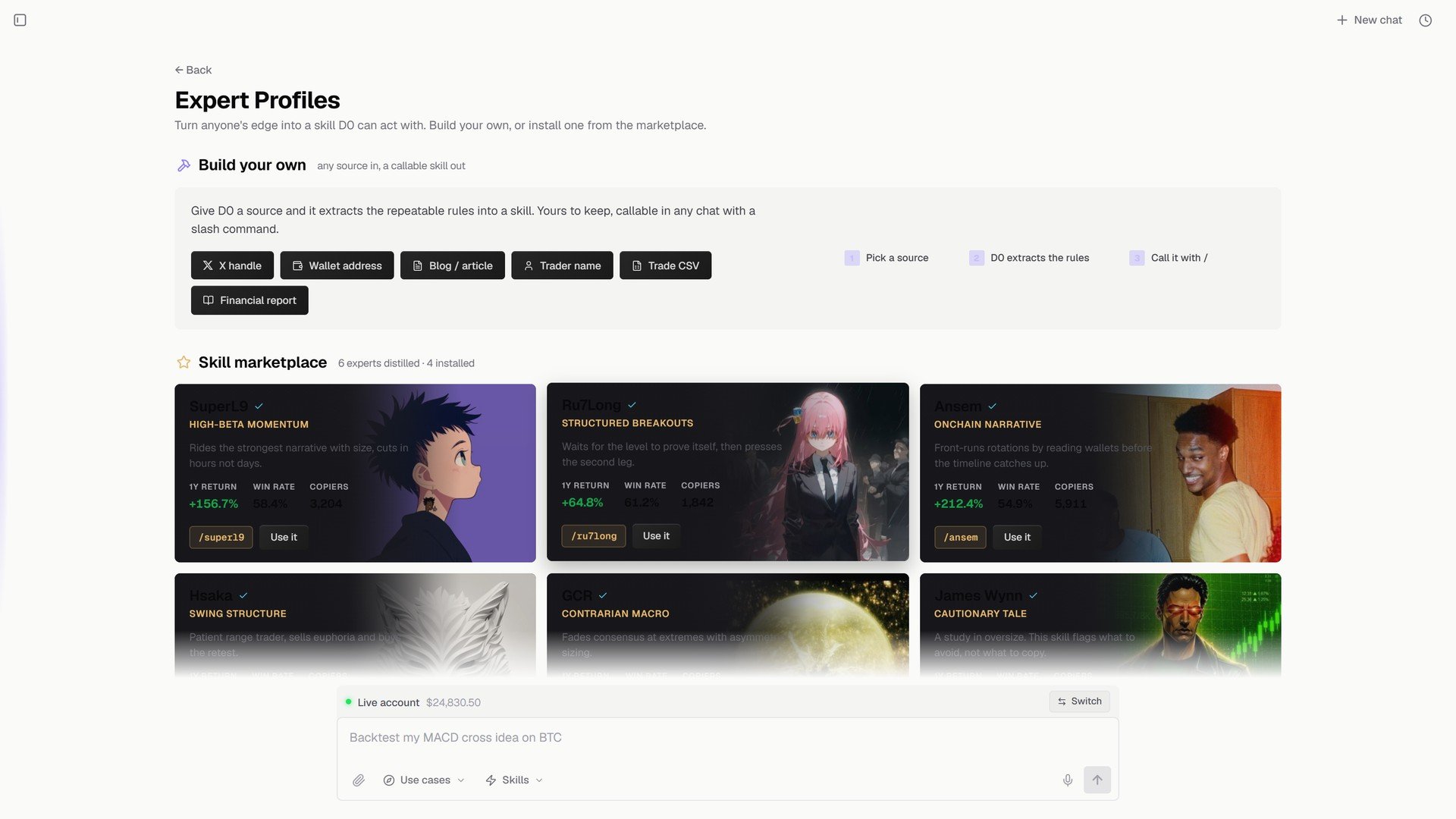
把任何人的优势变成 D0 能据以行动的技能。**Build your own**:给 D0 一个来源(X 账号、钱包地址、博客或文章、交易者名字、交易 CSV、财务报告),它提炼出可重复的规则,做成一个你在任何对话里用 `/` 调用的技能。或者从 **Skill marketplace** 安装一个。
运行一个策略走的是和策略库一样的仓位设置。见[运行策略:仓位管理](/zh/strategies/position-management)。
## Expert Profiles
把任何人的优势变成 D0 能据以行动的技能。**Build your own**:给 D0 一个来源(X 账号、钱包地址、博客或文章、交易者名字、交易 CSV、财务报告),它提炼出可重复的规则,做成一个你在任何对话里用 `/` 调用的技能。或者从 **Skill marketplace** 安装一个。
 ## Ask Anything
把问题打进 Explore 底部的对话框。D0 把它变成一次引导式运行:先问清楚它需要的,然后在对话里把事做完。
## 下一步
* [信号](/zh/features/thorp-strategy)
* [策略库](/zh/strategies/strategy-library)
* [使用 D0 的三种方式](/zh/chat/three-modes)
This documentation is built and hosted on [Mintlify](https://mintlify.com), a developer documentation platform.
## Ask Anything
把问题打进 Explore 底部的对话框。D0 把它变成一次引导式运行:先问清楚它需要的,然后在对话里把事做完。
## 下一步
* [信号](/zh/features/thorp-strategy)
* [策略库](/zh/strategies/strategy-library)
* [使用 D0 的三种方式](/zh/chat/three-modes)
This documentation is built and hosted on [Mintlify](https://mintlify.com), a developer documentation platform.