> ## Documentation Index
> Fetch the complete documentation index at: https://docs-d0.donutbrowser.ai/llms.txt
> Use this file to discover all available pages before exploring further.
# AI Trading Assistant
> This is the most common way people use D0 — as a real-time AI companion for everyday trading decisions and execution.
This is the most common way people use D0 — as a real-time AI companion for everyday trading decisions and execution.
## The Scenario
You're a crypto trader who follows multiple tokens. Every day, you need to:
* Check prices and trends
* Analyze charts before making entries
* Monitor market sentiment and social buzz
* Execute trades when the moment is right
* Stay informed about news and on-chain activity
Normally, this involves opening 5-6 different apps and websites. With D0, it's all one conversation — from research to execution.
Common starts: [What's the market looking like today?](https://t.me/donut_d0_agent_bot?text=What%27s%20the%20market%20looking%20like%20today%3F), [What's trending on crypto Twitter?](https://t.me/donut_d0_agent_bot?text=What%27s%20trending%20on%20crypto%20Twitter%3F), or [How does my portfolio look?](https://t.me/donut_d0_agent_bot?text=How%20does%20my%20portfolio%20look%3F).
## A Typical Morning Routine
Here's what a trading session might look like with your D0 Bot:
### 1. Market Overview (30 seconds)
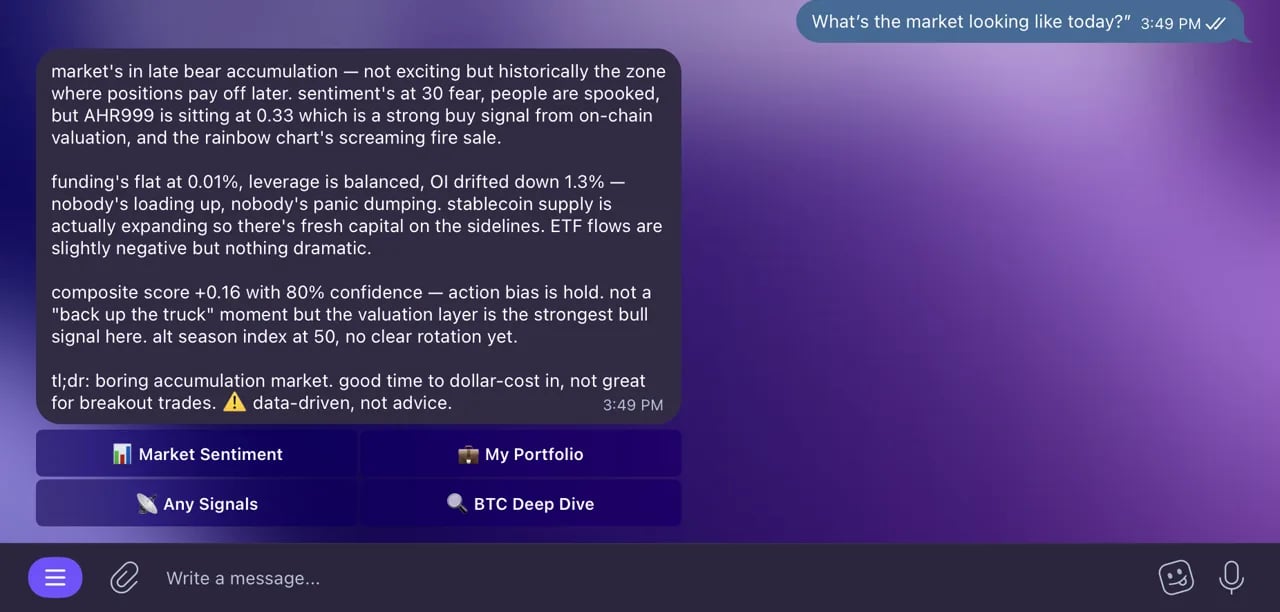 > **You:** "Good morning. What's the market looking like today?"
>
> **Bot:** "Market Sentiment: 68 (Greed).
>
> **BTC:** \$98,450 (+1.2% in 24h)
> **ETH:** \$3,850 (-0.3%)
> **SOL:** \$142 (+4.8%)
>
> Notable: SOL is outperforming after a major ecosystem announcement. Fear & Greed shifted from Neutral to Greed overnight."
### 2. Check Social Trends (30 seconds)
> **You:** "What's trending on crypto Twitter?"
>
> **Bot:** "Top trending tokens (24h):
>
> 1. SOL — 12,500 mentions (+180%)
> 2. WIF — 8,200 mentions (+250%)
> 3. JUP — 5,100 mentions (+120%)
>
> Top narrative: 'Solana DeFi Renaissance' — mentions up 340% this week.
> Jupiter announced a \$200M ecosystem fund. This is driving the SOL momentum."
### 3. Deep Dive on a Token (1 minute)
> **You:** "Good morning. What's the market looking like today?"
>
> **Bot:** "Market Sentiment: 68 (Greed).
>
> **BTC:** \$98,450 (+1.2% in 24h)
> **ETH:** \$3,850 (-0.3%)
> **SOL:** \$142 (+4.8%)
>
> Notable: SOL is outperforming after a major ecosystem announcement. Fear & Greed shifted from Neutral to Greed overnight."
### 2. Check Social Trends (30 seconds)
> **You:** "What's trending on crypto Twitter?"
>
> **Bot:** "Top trending tokens (24h):
>
> 1. SOL — 12,500 mentions (+180%)
> 2. WIF — 8,200 mentions (+250%)
> 3. JUP — 5,100 mentions (+120%)
>
> Top narrative: 'Solana DeFi Renaissance' — mentions up 340% this week.
> Jupiter announced a \$200M ecosystem fund. This is driving the SOL momentum."
### 3. Deep Dive on a Token (1 minute)
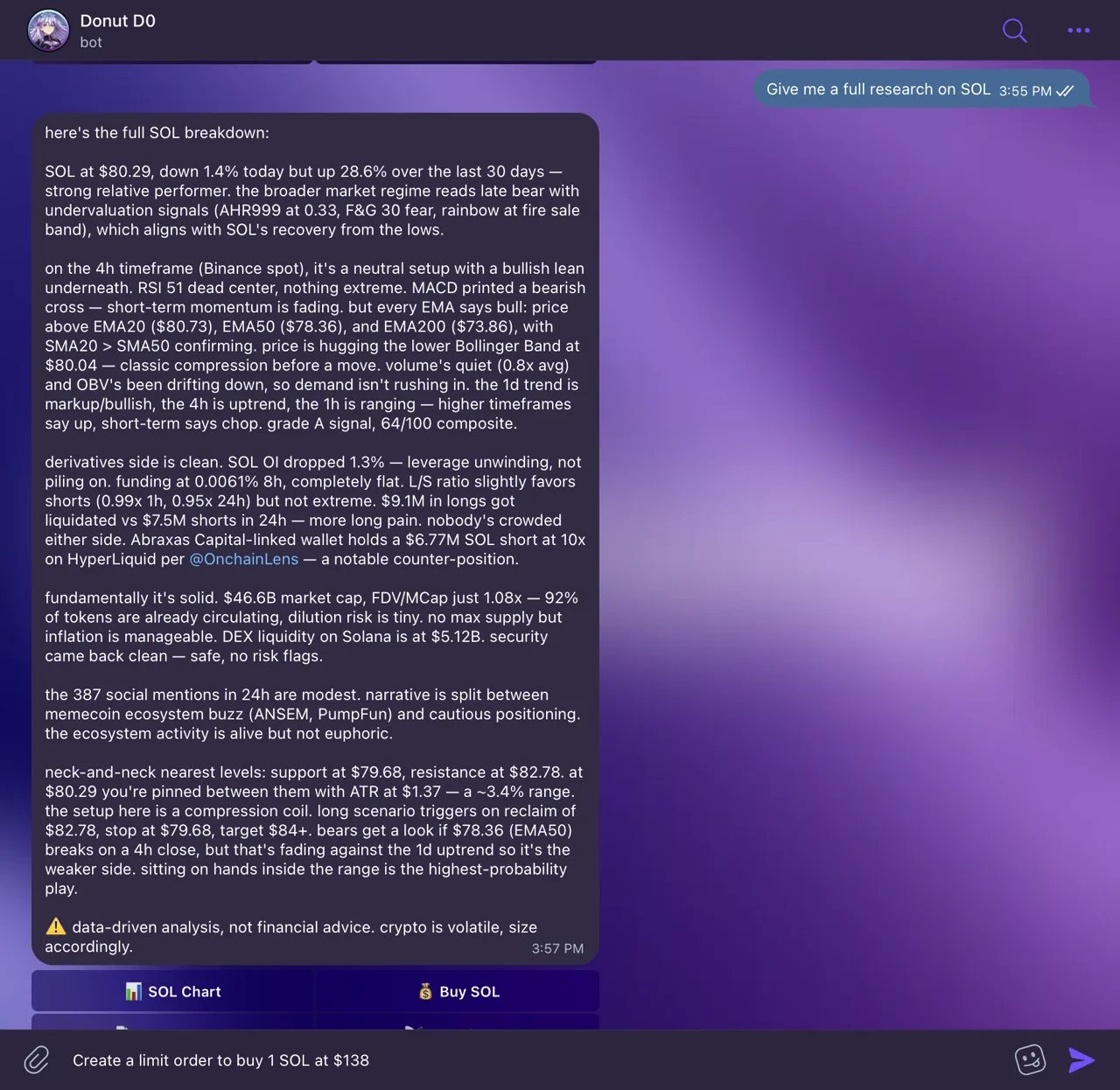 > **You:** "Give me a full research on SOL"
>
> **Bot:** "SOL analysis:
>
> * Price: \$142.35 (+4.8% in 24h, +12% in 7d)
> * Volume: \$3.2B (up 85% from yesterday)
> * Market cap: \$65.8B
> * Safety: 95/100
>
> Technical Analysis (4H):
>
> * Trend: Bullish, higher highs and higher lows
> * RSI: 64 — strong but not overbought
> * MACD: Bullish crossover 12 hours ago
> * Support: \$138 | Resistance: \$148, \$155
>
> Recent news: Jupiter announced a \$200M ecosystem fund. Top DEX volume on Solana hit ATH."
### 4. Chart Analysis (1 minute)
> **You:** *(sends a SOL/USDT 4H chart)*
> "Is this a good entry?"
>
> **Bot:** "Looking at the 4H chart:
>
> * Bullish breakout above the \$138 resistance with strong volume
> * RSI at 64 — momentum is strong but not overbought yet
> * Next resistance at \$148, then \$155
> * Support at \$138 (previous resistance)
>
> This looks like a healthy breakout. A pullback to \$138-\$140 could be a lower-risk entry."
### 5. Execute a Trade (15 seconds)
> **You:** "Swap 50 USDC to SOL"
>
> **Bot:** "Quote: You'll receive \~0.35 SOL for 50 USDC.
> Price impact: 0.01%. Route: USDC → SOL via Jupiter.
> Shall I execute?"
>
> **You:** "Yes"
>
> **Bot:** "Transaction submitted! TX: 5abc...xyz. You received 0.3498 SOL."
### 6. Set a Limit Order (10 seconds)
> **You:** "Give me a full research on SOL"
>
> **Bot:** "SOL analysis:
>
> * Price: \$142.35 (+4.8% in 24h, +12% in 7d)
> * Volume: \$3.2B (up 85% from yesterday)
> * Market cap: \$65.8B
> * Safety: 95/100
>
> Technical Analysis (4H):
>
> * Trend: Bullish, higher highs and higher lows
> * RSI: 64 — strong but not overbought
> * MACD: Bullish crossover 12 hours ago
> * Support: \$138 | Resistance: \$148, \$155
>
> Recent news: Jupiter announced a \$200M ecosystem fund. Top DEX volume on Solana hit ATH."
### 4. Chart Analysis (1 minute)
> **You:** *(sends a SOL/USDT 4H chart)*
> "Is this a good entry?"
>
> **Bot:** "Looking at the 4H chart:
>
> * Bullish breakout above the \$138 resistance with strong volume
> * RSI at 64 — momentum is strong but not overbought yet
> * Next resistance at \$148, then \$155
> * Support at \$138 (previous resistance)
>
> This looks like a healthy breakout. A pullback to \$138-\$140 could be a lower-risk entry."
### 5. Execute a Trade (15 seconds)
> **You:** "Swap 50 USDC to SOL"
>
> **Bot:** "Quote: You'll receive \~0.35 SOL for 50 USDC.
> Price impact: 0.01%. Route: USDC → SOL via Jupiter.
> Shall I execute?"
>
> **You:** "Yes"
>
> **Bot:** "Transaction submitted! TX: 5abc...xyz. You received 0.3498 SOL."
### 6. Set a Limit Order (10 seconds)
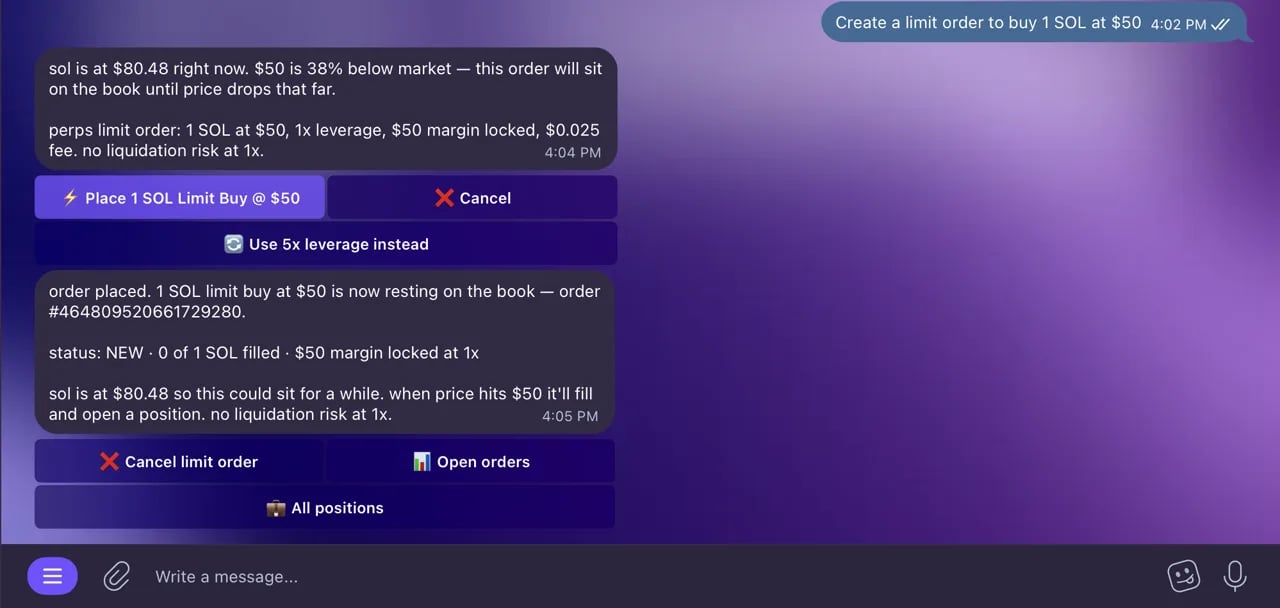 > **You:** "Create a limit order to buy 1 SOL at \$138"
>
> **Bot:** "Limit order preview: Buy 1 SOL when price drops to \$138 USDC.
> Execute?"
>
> **You:** "Yes"
>
> **Bot:** "Limit order created! Order ID: 12345. I'll fill the order when SOL reaches \$138."
### 7. Set an Alert (10 seconds)
> **You:** "Alert me if SOL drops back to \$138"
>
> **Bot:** "Done! I'll notify you when SOL goes below \$138. Current price: \$142.35."
### 8. Check Your Portfolio (15 seconds)
> **You:** "How does my portfolio look?"
>
> **Bot:** "**Wallet:** \$14,630 (+3.5% today)
>
> * SOL: 42.85 (\$6,085) — 41.6%
> * USDC: 3,450 (\$3,450) — 23.6%
> * JUP: 2,100 (\$2,604) — 17.8%
> * ...
>
> **Perps Account:** Equity \$5,200, Available \$3,800
>
> **Total:** \$19,830"
**Total time: about 5 minutes.** That's a complete trading session — market overview, social trends, token research, chart analysis, trade execution, limit order, alert setup, and portfolio review — all in one place.
## Why This Works
| Without D0 | With D0 |
| ------------------------------------------------------- | ------------------------------------ |
| Open CoinGecko → Search tokens → Compare prices | "What's the market looking like?" |
| Open Twitter → Scroll through feeds → Find trends | "What's trending on crypto Twitter?" |
| Open TradingView → Load chart → Read indicators | Send screenshot → Get analysis |
| Open Rugcheck → Paste address → Read report | "Is this token safe?" |
| Open Jupiter → Connect wallet → Configure swap → Sign | "Swap 50 USDC to SOL" → "Yes" |
| Open wallet app → Check balances → Calculate allocation | "How's my portfolio?" |
| Open alert app → Create rule → Set conditions | "Alert me when SOL hits \$150" |
## Pro Tips for Trading with D0
1. **Start your day with trends** — Ask for both market overview and social trends to get the full picture
2. **Use the two-step workflow** — Every trade shows a preview first, so you can verify before committing funds
3. **Research before trading** — Ask for technical analysis + fundamentals + social sentiment before making a decision
4. **Set alerts at key levels** — After chart analysis, immediately set alerts at the support/resistance levels your bot identified
5. **Use limit orders for precision** — Don't want to buy at market price? Set a limit order at your target entry
6. **Combine data points** — Ask for fundamentals, then send a chart, then check sentiment. Your bot keeps context from the whole conversation
7. **Quick checks throughout the day** — Price checks and portfolio updates take seconds
8. **Check your orders** — Ask "show my orders" to track limit orders and their status
> **You:** "Create a limit order to buy 1 SOL at \$138"
>
> **Bot:** "Limit order preview: Buy 1 SOL when price drops to \$138 USDC.
> Execute?"
>
> **You:** "Yes"
>
> **Bot:** "Limit order created! Order ID: 12345. I'll fill the order when SOL reaches \$138."
### 7. Set an Alert (10 seconds)
> **You:** "Alert me if SOL drops back to \$138"
>
> **Bot:** "Done! I'll notify you when SOL goes below \$138. Current price: \$142.35."
### 8. Check Your Portfolio (15 seconds)
> **You:** "How does my portfolio look?"
>
> **Bot:** "**Wallet:** \$14,630 (+3.5% today)
>
> * SOL: 42.85 (\$6,085) — 41.6%
> * USDC: 3,450 (\$3,450) — 23.6%
> * JUP: 2,100 (\$2,604) — 17.8%
> * ...
>
> **Perps Account:** Equity \$5,200, Available \$3,800
>
> **Total:** \$19,830"
**Total time: about 5 minutes.** That's a complete trading session — market overview, social trends, token research, chart analysis, trade execution, limit order, alert setup, and portfolio review — all in one place.
## Why This Works
| Without D0 | With D0 |
| ------------------------------------------------------- | ------------------------------------ |
| Open CoinGecko → Search tokens → Compare prices | "What's the market looking like?" |
| Open Twitter → Scroll through feeds → Find trends | "What's trending on crypto Twitter?" |
| Open TradingView → Load chart → Read indicators | Send screenshot → Get analysis |
| Open Rugcheck → Paste address → Read report | "Is this token safe?" |
| Open Jupiter → Connect wallet → Configure swap → Sign | "Swap 50 USDC to SOL" → "Yes" |
| Open wallet app → Check balances → Calculate allocation | "How's my portfolio?" |
| Open alert app → Create rule → Set conditions | "Alert me when SOL hits \$150" |
## Pro Tips for Trading with D0
1. **Start your day with trends** — Ask for both market overview and social trends to get the full picture
2. **Use the two-step workflow** — Every trade shows a preview first, so you can verify before committing funds
3. **Research before trading** — Ask for technical analysis + fundamentals + social sentiment before making a decision
4. **Set alerts at key levels** — After chart analysis, immediately set alerts at the support/resistance levels your bot identified
5. **Use limit orders for precision** — Don't want to buy at market price? Set a limit order at your target entry
6. **Combine data points** — Ask for fundamentals, then send a chart, then check sentiment. Your bot keeps context from the whole conversation
7. **Quick checks throughout the day** — Price checks and portfolio updates take seconds
8. **Check your orders** — Ask "show my orders" to track limit orders and their status