> ## Documentation Index
> Fetch the complete documentation index at: https://docs-d0.donutbrowser.ai/llms.txt
> Use this file to discover all available pages before exploring further.
# D0 Analyze
> One click on the market header and D0 breaks the market down in chat. No prompt to write.
**D0 Analyze** sits in the market header of the Trade view, next to the price, market cap, liquidity, volume, and holders. Click it and D0 reads the selected market and answers in the chat panel.
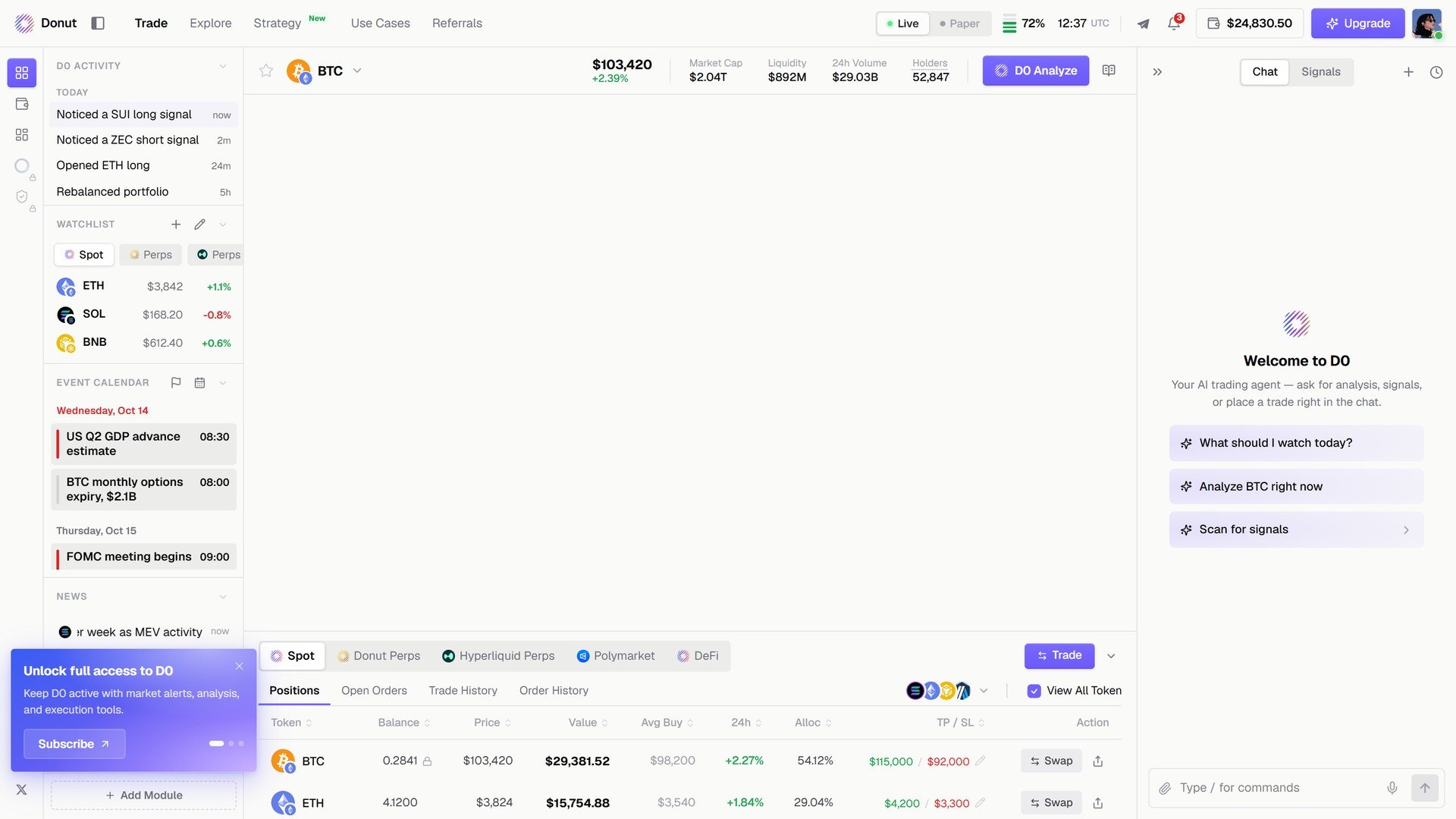 What the read covers:
| Market | What D0 analyzes |
| - | - |
| A spot or perps market | Structure on the chart, momentum, funding and open interest, where it would wait for before sizing in |
| A Polymarket market | Pricing, resolution conditions, liquidity |
| Your portfolio (from the Portfolio page, as **Ask D0**) | Concentration, open risk, what to watch |
The answer arrives like any other D0 message, with follow-up actions: **Set alert at the reclaim level**, **Open trade ticket**, **Watch this market**.
**Analyze before you trade.** One click gives you the read without writing a prompt. Then decide whether to open the order modal.
## What's next
* [The Trade Panel](/trade/trade-panel): where the button lives
* [Market Analysis](/features/market-analysis): what goes into a read
* [Portfolio Overview](/portfolio/overview): **Ask D0** on your whole book
This documentation is built and hosted on [Mintlify](https://mintlify.com), a developer documentation platform.
What the read covers:
| Market | What D0 analyzes |
| - | - |
| A spot or perps market | Structure on the chart, momentum, funding and open interest, where it would wait for before sizing in |
| A Polymarket market | Pricing, resolution conditions, liquidity |
| Your portfolio (from the Portfolio page, as **Ask D0**) | Concentration, open risk, what to watch |
The answer arrives like any other D0 message, with follow-up actions: **Set alert at the reclaim level**, **Open trade ticket**, **Watch this market**.
**Analyze before you trade.** One click gives you the read without writing a prompt. Then decide whether to open the order modal.
## What's next
* [The Trade Panel](/trade/trade-panel): where the button lives
* [Market Analysis](/features/market-analysis): what goes into a read
* [Portfolio Overview](/portfolio/overview): **Ask D0** on your whole book
This documentation is built and hosted on [Mintlify](https://mintlify.com), a developer documentation platform.