> ## Documentation Index
> Fetch the complete documentation index at: https://docs-d0.donutbrowser.ai/llms.txt
> Use this file to discover all available pages before exploring further.
# Voice Command
> Talk to your bot instead of typing. D0 supports voice messages for hands-free trading and analysis.
Talk to your bot instead of typing. D0 supports voice messages for hands-free trading and analysis.
 ## How It Works
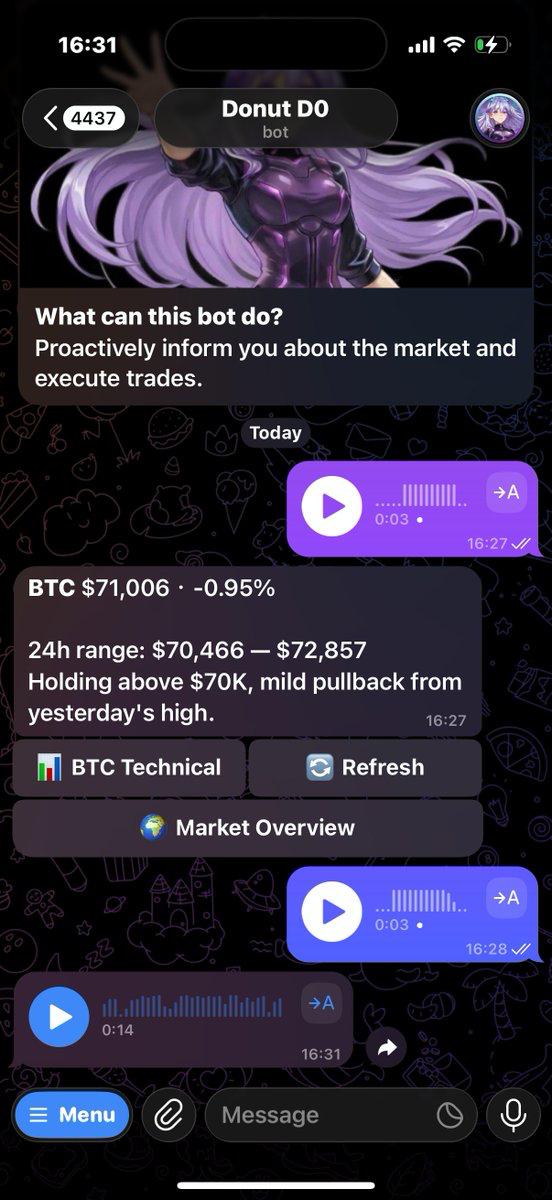
Open your chat with D0 on Telegram, tap the microphone button, and speak your command. Your bot transcribes what you said and executes it just like a typed message.
Works for everything — trading, analysis, alerts, portfolio checks, chart questions. **If you can type it, you can say it.**
## When Voice Commands Are Useful
**You're driving or walking.** Keep your eyes on the road or the sidewalk. Just ask your bot for a price check or portfolio update without looking at your screen.
**You're at the gym.** Hands are busy but you want to check if your limit order filled or set a quick alert. Just speak it.
**You're multitasking.** Cooking, working, doing something else with your hands. Voice is faster than stopping what you're doing to type.
**You want to ask something complex.** Sometimes it is easier to explain what you want out loud instead of typing a long message. Just talk through it.
## What You Can Do with Voice
Everything you can type, you can say:
* "What's the price of Solana right now?"
* "Swap 50 USDC to SOL"
* "Show me my open positions"
* "Alert me when Bitcoin hits 100,000"
* "Is this a good time to buy ETH?"
* "What's trending on crypto Twitter?"
Your bot processes voice commands exactly the same way it processes text. The only difference is you are speaking instead of typing.
## Tips for Better Voice Recognition
**Speak clearly.** You don't need to shout or slow down dramatically, just talk normally and clearly.
**Use full token names for clarity.** "Solana" instead of "SOL" helps avoid confusion, especially for tokens with similar-sounding tickers.
**Avoid background noise.** If you're in a loud place the transcription might not be accurate. Find a quieter spot or just type instead.
**Check the transcription.** Your bot shows what it heard before executing. If the transcription is wrong, just correct it in a follow-up message.
## Example Conversation
> **You:** *(voice message)* "Hey, what's the current price of Ethereum and is it a good time to buy?"
>
> **Bot:** "ETH is currently at \$3,245, up 2.1% in the last 24 hours. Looking at the 4H chart, it's in an uptrend with support at \$3,180 and resistance at \$3,400. RSI is at 58, so there's room for upside. If you're looking to enter, waiting for a pullback to \$3,180–\$3,200 could give you a better risk/reward."
Your bot understood the voice message and gave you both the price and the analysis you asked for.
## How It Works
Open your chat with D0 on Telegram, tap the microphone button, and speak your command. Your bot transcribes what you said and executes it just like a typed message.
Works for everything — trading, analysis, alerts, portfolio checks, chart questions. **If you can type it, you can say it.**
## When Voice Commands Are Useful
**You're driving or walking.** Keep your eyes on the road or the sidewalk. Just ask your bot for a price check or portfolio update without looking at your screen.
**You're at the gym.** Hands are busy but you want to check if your limit order filled or set a quick alert. Just speak it.
**You're multitasking.** Cooking, working, doing something else with your hands. Voice is faster than stopping what you're doing to type.
**You want to ask something complex.** Sometimes it is easier to explain what you want out loud instead of typing a long message. Just talk through it.
## What You Can Do with Voice
Everything you can type, you can say:
* "What's the price of Solana right now?"
* "Swap 50 USDC to SOL"
* "Show me my open positions"
* "Alert me when Bitcoin hits 100,000"
* "Is this a good time to buy ETH?"
* "What's trending on crypto Twitter?"
Your bot processes voice commands exactly the same way it processes text. The only difference is you are speaking instead of typing.
## Tips for Better Voice Recognition
**Speak clearly.** You don't need to shout or slow down dramatically, just talk normally and clearly.
**Use full token names for clarity.** "Solana" instead of "SOL" helps avoid confusion, especially for tokens with similar-sounding tickers.
**Avoid background noise.** If you're in a loud place the transcription might not be accurate. Find a quieter spot or just type instead.
**Check the transcription.** Your bot shows what it heard before executing. If the transcription is wrong, just correct it in a follow-up message.
## Example Conversation
> **You:** *(voice message)* "Hey, what's the current price of Ethereum and is it a good time to buy?"
>
> **Bot:** "ETH is currently at \$3,245, up 2.1% in the last 24 hours. Looking at the 4H chart, it's in an uptrend with support at \$3,180 and resistance at \$3,400. RSI is at 58, so there's room for upside. If you're looking to enter, waiting for a pullback to \$3,180–\$3,200 could give you a better risk/reward."
Your bot understood the voice message and gave you both the price and the analysis you asked for.